


Showing posts with label Poker Software. Show all posts
Showing posts with label Poker Software. Show all posts

Remove NoteCaddy Scatter Graph For Hero
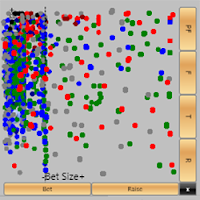
There's no option to turn of the Hero Scatter graph in NoteCaddy and the developers haven't made it a priority to add that option even though a few people have asked. There are however a few options to alleviate the issue so you don't run into problems with your computer freezing after you've just 4 bet AA.
First, you can turn off the Hero HUD in the General Settings for the HUD you're using. This is an easy fix but I like to keep my HUD open when I'm playing.
Another quick fix is to go into the Settings for NoteCaddy and turn off note taking for Hero. This works and you can still use the HUD but you don't get to see notes that are taken for yourself. Personally I like to see the notes taken for me to see where I can make changes.
Lastly, you can just clear all the scatter data for yourself and leave everyone else's in tact. This way note taking is still enabled for Hero and you can use the Hero HUD.
To do this, open up pgAdmin III, the admin interface for PostgeSQL, the database Hold'em Manager and NoteCaddy uses. Connect to the database you're using with Hold'em Manager and then click on the SQL button. It will bring up a new window that allows you to enter SQL queries to run against the database.
Copy and paste the following SQL statement into the SQL Editor, replacing YOURSCREENNAMEHERE with your poker site screenname and hit CTRL-E to run the query.
delete from notecaddy_scatter where player_id in (select player_id from players where playername ilike 'YOURSCREENNAMEHERE');
It will clear all the scatter data for whichever username you use in YOURSCREENNAMEHERE so if you want to delete the scatter data for other players you can do that as well.
As NoteCaddy continues to take notes it will add more scatter data so every 10k hands, or however many you feel necessary to reduce lag, run that same query again.
SnG Hand Histories from PTR Sale

Plus you'll also get 14 free days of SnG daily hand updates with your order if you use the promo code.
PokerTableRatings has been tracking cash game hands for hold 'em and omaha for Full Tilt Poker, PokerStars, Absolute/Ulitmate Bet, Bodog, iPoker/Titan, Party Poker and recently the Cake Poker.
Like other data mining sites they allow you to size up your competition quickly. Through their website you can review a players playing style, win/loss record and even watch recent sessions. Their new PTR Premium service gives you a more in-depth analysis and even provides typical HUD stats in the PTR replayer.
For months PTR has secretly been data mining SNG hand histories as well and has now made them available for purchase. Like their cash game hand histories these files can be imported into your poker analytics software such as Holdem Manager or Poker Office. This can give you more insight into players than just their win/loss record that other sites such as SharkScope provide.
One problem though. Data mining and trading/purchasing hand histories violates the terms and conditions of most major poker rooms.
PokerTableRatings Premium Is Online
PokerTableRatings is a service that data mines no-limit holdem and Omaha cash games across various online poker rooms.
You can review your own hands and stats as well as those of other players. From their website you can access basic statistics for free or you could purchase hand histories to import into your poker stat software such as Holdem Manager, PokerOffice or PokerTracker.
PokerTableRatings today has launched a new PTR Premium service which expands on the stats you can find on their website.
PokerTableRatings New Replayer
I noticed Daniel Negreanu tweeted that he was going to hit the 100/200 NLHE tables on Pokerstars after busting out of the EPT main event in Monte Carlo. I missed the live action so I turned to PokerTableRatings to check out the replay.
PokerTableRatings.com (PTR) is a site where you can check both your own and other players cash game stats (NLHE and Omaha only). You can even download hand histories to import into PokerTracker, PokerOffice or Holdem Manager to give your database a boost.
PTR provides a lot of information as well as the ability to replay hands and sessions. The PTR hand replayer was recently overhauled but I just noticed that there was another change that looks like it came online today.
PokerTableRatings.com (PTR) is a site where you can check both your own and other players cash game stats (NLHE and Omaha only). You can even download hand histories to import into PokerTracker, PokerOffice or Holdem Manager to give your database a boost.
PTR provides a lot of information as well as the ability to replay hands and sessions. The PTR hand replayer was recently overhauled but I just noticed that there was another change that looks like it came online today.
Table Selection For Micro Limit Cash Games

Unlike most live casinos you can choose which table to sit at when playing online poker. You can try and find soft tables with lots of fish and avoid tables full of good regulars.
But how important is table selection at low and micro stakes games? That's one thing I'm still trying to figure out but I've tried a few different things and have some opinions.
Holdem Manager vs PokerOffice Part I

There are three software options that can do all that. Holdem Manager, PokerOffice and PokerTracker. I had played around with PokerOffice and PokerTracker in the past. Of the two I preferred PokerOffice. Searching through forums I saw a lot of people raving about Holdem Manager so I decided to try and find out more about each.
I Googled around for "Holdem Manager vs PokerOffice" and ready many forum posts and blogs. Unfortunately there wasn't much useful information. It felt like 90% of what I read was of the "ABC is the suxxor! Use XYZ!" type.
I knew exactly what I needed poker analytic software to do for me but I was having a hard time finding out if PokerOffice or Holdem Manager could do those things. So I decided to use both and take notes of my experience.
Figured others might be having as hard a time as I was deciding so I put my notes and a whole bunch of screen shots together to make a review of Holdem Manager and PokerOffice.
I bought one and wind up getting and enhanced trial version of the other so I could really look at both in depth. This is a long post with a lot of details to try and help you make the right purchase decision but I still recommend you also download and try each one at a time. Reading these posts will give you a head start so you can make the most of the limited trials
PokerOffice Free Trial - Exclusive 2 Week Free Trial for my readers! Must use this link.
Holdem Manager - Free Trial
In the first part of this review I'm going to cover importing hand histories, heads up displays, other live action windows and the replayers of both programs.
Increase Holdem Manager Performance - Sale on SSDs
If you use poker tracking software such as Holdem Manager, PokerTracker or PokerOffice, you might have noticed that some features, such as reports run slower as you accumulate more hands.
The computations they perform aren't all that difficult. The issue comes down to the sheer amount of data they need read and write from the disk. If you ever run a program that monitors your CPU usage, you might have noticed that even though the program is running slow, the CPU is barely being used, but the hard drive is trashing around like crazy.
The best way to increase performance for these programs is to use a faster hard drive. The fastest drives by far on the market now are Solid State Drives (SSD). Newegg is currently running some sales with some SSD manufacturers offering big mail-in rebates. If you're not familiar with Newegg (you must live under a rock) they are one of the largest and best online computer retailers. I've purchased a ton of items from them for desktops and servers. They also make it very easy for you to claim your rebates.
![]()
 The OCZ Vertex Series OCZSSD2-1VTX30GXXX 2.5" MLC Internal Solid State Drive (SSD)
 normally sells for $164.00.
Newegg is currently has it on sale for $119.99 and on top of that there is a $30 mail-in rebate and free shipping bringing the price down to $89.99 after rebate.
![]()
 The OCZ Vertex Series OCZSSD2-1VTX60G 2.5" MLC Internal Solid State Drive (SSD)
 normally sells for $259.00.
It's on sale for $60 off, free shipping, free 4GB flash memory card and a $30 mail-in rebate.
Final price after rebate is only $169.00
If you need a little more disk space, (but chances are you don't unless you're buying a ton of hand histories from places like PokerTableRatings) there's a 120GB Model.
![]()
 The OCZ Vertex Series OCZSSD2-1VTX120G 2.5" MLC Internal Solid State Drive (SSD)
 normally sells for $499.00.
Current promotion is $170 off, free 4GB flash card, free shipping and a $40 mail-in rebate.
Final price comes down to $289.00 after rebate.
If you're using Holdem Manager or PokerTracker, both of them use the PostgreSQL database and it's pretty easy to setup PostgreSQL to look for the data in a different location.
PokerOffice uses an embeded database so you'll need to reinstall it on the new SSD as far as I can tell. But check with the support people at PokerOffice to confirm.
The computations they perform aren't all that difficult. The issue comes down to the sheer amount of data they need read and write from the disk. If you ever run a program that monitors your CPU usage, you might have noticed that even though the program is running slow, the CPU is barely being used, but the hard drive is trashing around like crazy.
The best way to increase performance for these programs is to use a faster hard drive. The fastest drives by far on the market now are Solid State Drives (SSD). Newegg is currently running some sales with some SSD manufacturers offering big mail-in rebates. If you're not familiar with Newegg (you must live under a rock) they are one of the largest and best online computer retailers. I've purchased a ton of items from them for desktops and servers. They also make it very easy for you to claim your rebates.
Newegg is currently has it on sale for $119.99 and on top of that there is a $30 mail-in rebate and free shipping bringing the price down to $89.99 after rebate.
It's on sale for $60 off, free shipping, free 4GB flash memory card and a $30 mail-in rebate.
Final price after rebate is only $169.00
If you need a little more disk space, (but chances are you don't unless you're buying a ton of hand histories from places like PokerTableRatings) there's a 120GB Model.
Current promotion is $170 off, free 4GB flash card, free shipping and a $40 mail-in rebate.
Final price comes down to $289.00 after rebate.
If you're using Holdem Manager or PokerTracker, both of them use the PostgreSQL database and it's pretty easy to setup PostgreSQL to look for the data in a different location.
PokerOffice uses an embeded database so you'll need to reinstall it on the new SSD as far as I can tell. But check with the support people at PokerOffice to confirm.
Cash Game Bankroll Management Spreadsheet
A common reason many new (and even experienced) poker players go broke is because they fail to follow good bankroll management practices.
One of the most important aspects of good bankroll management is keeping records of your sessions so you can track your progress and know when to move up or down in stakes.
 You don't need any fancy software to practice good bankroll management. For my own cash game challenge I've just been using a spreadsheet on Google Docs. The nice thing about using Google Docs is that I can access the spreadsheet from anywhere using a web browser, it's free and I can include a bankroll chart on my blog. It instantly gets updated when I update the spreadsheet.
Because a lot of people have been willing to share their knowledge online I've been able to have good results in online poker I figured I'd try and do the same and share my spreadsheet. I even made significant updates to it so it's even easier than what I first started using.
Hopefully my bankroll management spreadsheet helps your game but to really improve check out my BlueFirePoker review as well.
One of the most important aspects of good bankroll management is keeping records of your sessions so you can track your progress and know when to move up or down in stakes.

Because a lot of people have been willing to share their knowledge online I've been able to have good results in online poker I figured I'd try and do the same and share my spreadsheet. I even made significant updates to it so it's even easier than what I first started using.
Hopefully my bankroll management spreadsheet helps your game but to really improve check out my BlueFirePoker review as well.
DoN SnG Challenge Update 7
As you can see from the chart, things haven't been going very well in this challenge. February was a brutal month.
The only impressive thing about the chart is that I figured out a way to color it so that I can indicate where different blog updates were. The first set of sessions is covered in the first update, second set in red in the second update, 3rd set in blue 3rd update etc.
When I posted my last update my bankroll was up to $514.60. My low point for February was when my bankroll sunk to $371, a loss of $143.60 or around 26 buy-ins!
Subscribe to:
Posts (Atom)
